Attackers Are Targeting Your Backups. Here’s How to Protect Them
Summary
- Ransomware attackers now systematically target and destroy backups first to eliminate recovery options and force ransom payments.
- Acronis threat intelligence reports a 50% surge in ransomware, emphasizing the vulnerability of standard backup systems.
- A resilient defense requires a layered backup strategy, including immutable (WORM) storage, strict network segmentation, and zero-trust access controls.
- Healthcare organizations must prioritize secure, compliant backup architectures to prevent operational downtime and protect patient safety.
Modern ransomware groups are no longer just encrypting operational files; they are actively hunting and destroying backups first. A recent 50% surge in ransomware highlights the urgent need for organizations—especially in highly targeted sectors like healthcare—to implement a resilient, layered backup strategy that guarantees recovery.
AI Generated Audio Recap
The Shift in Ransomware Tactics: Why Backups Are Target Number One
Cybercriminals recognize that reliable backups are an organization’s ultimate defense against extortion. By locating, encrypting, or deleting backup repositories first, attackers eliminate your recovery options, forcing organizations to pay the ransom to restore critical business operations.
Threat intelligence from Acronis reveals a dramatic 50% surge in ransomware incidents, driven by threat actors who systematically target shadow copies, cloud backup consoles, and local backup servers. Additionally, research from Barracuda on emerging threat groups, such as those operating in the shadow of larger ransomware syndicates, shows that modern intrusion paths focus heavily on credential harvesting. Once inside a network, these attackers do not immediately deploy encryption. Instead, they quietly conduct internal reconnaissance to locate and compromise your data protection infrastructure.
When backups are stored on the same network domain or use the same administrative credentials as the primary systems, they become easy targets. If an attacker gains domain administrator privileges, they can access the backup software console, delete historical recovery points, and disable scheduled backup jobs before initiating the visible phase of the attack.
Key Vulnerabilities That Put Your Backups at Risk
Insecure network configurations, shared administrative credentials, and lack of network segmentation allow attackers to easily pivot from a single compromised endpoint to your primary backup servers. Without strict access controls, your offline defenses can be neutralized in minutes.
Several common security gaps expose backup systems to compromise:
- Unified Identity Access Management: Using the same Active Directory credentials for both everyday network administration and backup system access allows attackers to compromise both simultaneously.
- Lack of Network Segmentation: If your backup storage devices sit on the same flat network as user workstations and production servers, ransomware can easily discover and target them.
- Disabled Multi-Factor Authentication (MFA): Failing to enforce MFA on backup administration portals allows attackers who harvest credentials to log in and delete cloud-based retention points.
To mitigate these risks, organizations must implement robust identity security solutions from partners like Okta to secure administrative access, alongside zero-trust endpoint controls from ThreatLocker to block unauthorized software from interacting with local backup directories.
Building a Layered Backup Strategy to Survive the Attack
A modern backup strategy requires more than just daily copies; it demands immutable storage, strict network isolation, and continuous monitoring. Implementing a 3-2-1-1-0 rule ensures that at least one copy of your data remains completely offline and unalterable.
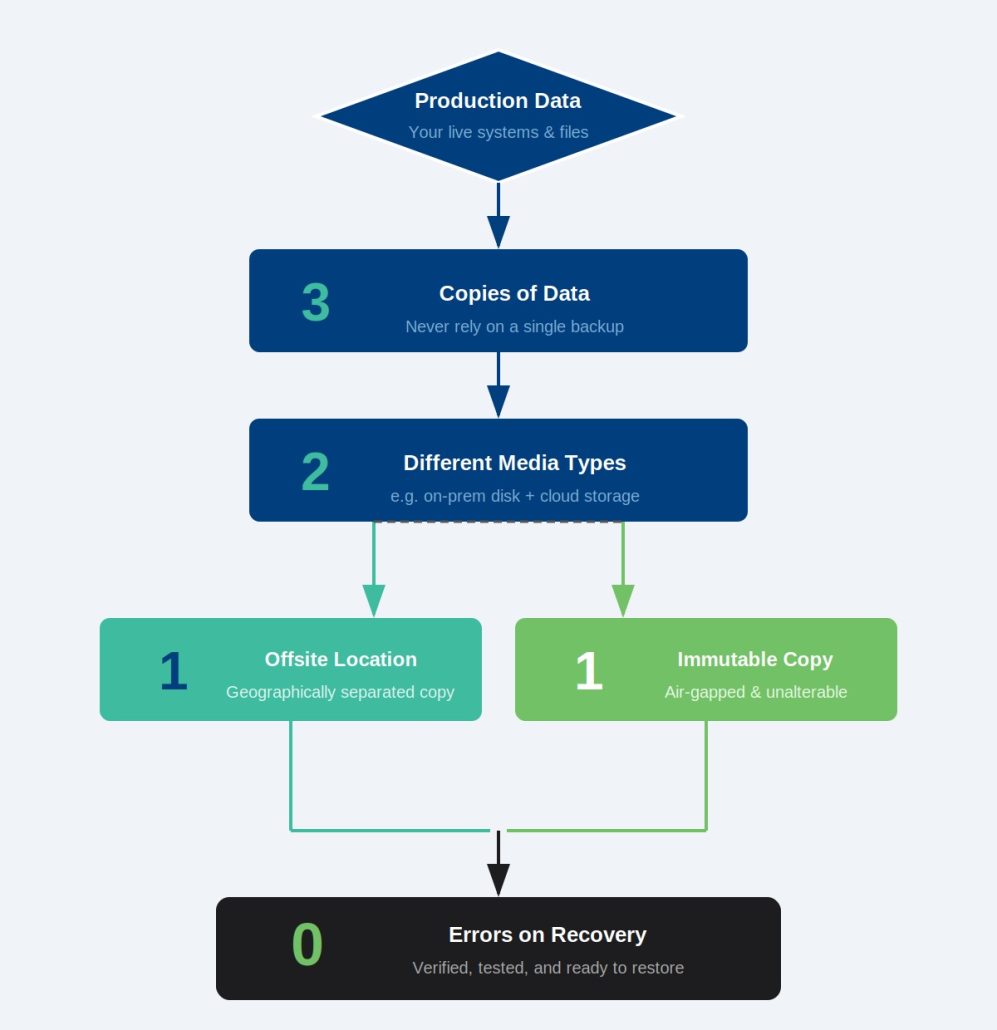
To build a defense-in-depth architecture that survives targeted backup attacks, implement the following layers:
1. Enforce Immutable Storage and Air-Gapping
Immutable backups prevent data from being modified, overwritten, or deleted for a set retention period, even by administrators with compromised credentials. Combining this with physical or logical air-gapping ensures that ransomware cannot reach your secondary recovery points.
Using solutions from Acronis and Barracuda, organizations can write backup data to write-once-read-many (WORM) storage. This ensures that even if an attacker gains access to the backup management console, they cannot delete historical recovery points until the retention timer expires.
2. Implement Zero-Trust Network Segmentation
Isolating backup networks from the rest of the corporate environment prevents lateral movement during an active security incident. Restricting access to backup infrastructure ensures that compromised user devices cannot communicate with vault environments.
Configure dedicated, non-routable virtual local area networks (VLANs) for backup traffic. Integrate advanced endpoint detection and response (EDR) from SentinelOne or CrowdStrike to monitor backup servers for anomalous behavior, such as sudden spikes in CPU usage or unauthorized attempts to modify system registries.
3. Continuous Monitoring and Rapid Recovery Testing
Regular, automated testing of your disaster recovery plan ensures that your backup files are not corrupted and can be restored quickly under pressure. Continuous monitoring alerts security teams to anomalous data deletion or encryption activities instantly.
Utilize automated recovery verification tools to mount backups in isolated environments and test their integrity daily. This prevents the common pitfall of discovering that backup files are corrupted only when attempting an emergency restore.
Protecting Healthcare and Critical Infrastructure
Healthcare organizations are premier targets due to the life-safety implications of operational downtime. Securing patient records and clinical applications requires specialized, compliant backup architectures that protect data integrity while maintaining continuous availability.
In healthcare environments, backup security is not just an IT concern; it is a patient safety imperative. When ransomware disrupts electronic health record (EHR) systems, clinical operations grind to a halt, forcing patient diversions and delaying critical care.
A layered backup strategy tailored for healthcare must comply with HIPAA security rules while ensuring rapid recovery times. By leveraging secure cloud environments like Microsoft Azure Backup, healthcare IT teams can maintain encrypted, isolated copies of patient databases. Combining this with continuous threat monitoring ensures that clinical data remains safe, verifiable, and rapidly restorable during an emergency.
Take Control of Your Backup Security Today
Don’t wait for a ransomware event to discover that your recovery paths have been destroyed. Partnering with security experts allows you to design, deploy, and monitor a resilient backup framework that keeps your organization operational through any disruption.
Securing your backups against modern, targeted ransomware attacks requires specialized expertise and continuous oversight. At CIT Solutions, we help organizations design and manage resilient backup architectures that stand up to sophisticated cyber threats.
Are you ready to evaluate your backup resilience? Get in Contact with our security team today to schedule a comprehensive backup security assessment.
Sources:
- Acronis Threat Research | https://www.acronis.com/en-us/blog/posts/msp-cybersecurity-news-digest-may-5-2026
- Barracuda Threat Intelligence | https://blog.barracuda.com/2026/05/01/nightspire-wannabe-warlords-in-ransomwares-shadow-realm