What to Check Before You Turn On Microsoft Copilot for Your Nonprofit
Summary
- Microsoft Agent 365 is now generally available, introducing powerful agentic AI capabilities to non-profit organizations.
- Ungoverned permissions and overshared SharePoint data present significant security risks when deploying Microsoft Copilot.
- A robust pre-deployment strategy must include permission audits, identity management, sensitivity labeling, and staff training.
- Leveraging partner tools from AvePoint, Okta, and Knowbe4 helps secure your data environment before activating AI capabilities.
Nonprofits are rapidly adopting Microsoft Copilot and Agent 365. As a result, they can automate administrative tasks and draft grant proposals. In addition, these tools help organizations improve donor engagement. However, deploying generative AI without proper data governance creates significant risks. Without the right controls, sensitive donor records may be exposed to unauthorized users. Furthermore, financial statements and internal communications can also be put at risk. Before activating these powerful tools, organizations must ensure their underlying data environment is secure, organized, and properly governed.
AI Generated Audio Recap
The Promise and Peril of Agent 365 in the Non-Profit Sector
Agent 365 transforms how nonprofits manage workflows by integrating autonomous, agentic AI directly into Microsoft 365. Yet, because this technology synthesizes information across your entire tenant, it can easily surface overshared or poorly secured SharePoint files to any employee with a basic search query.
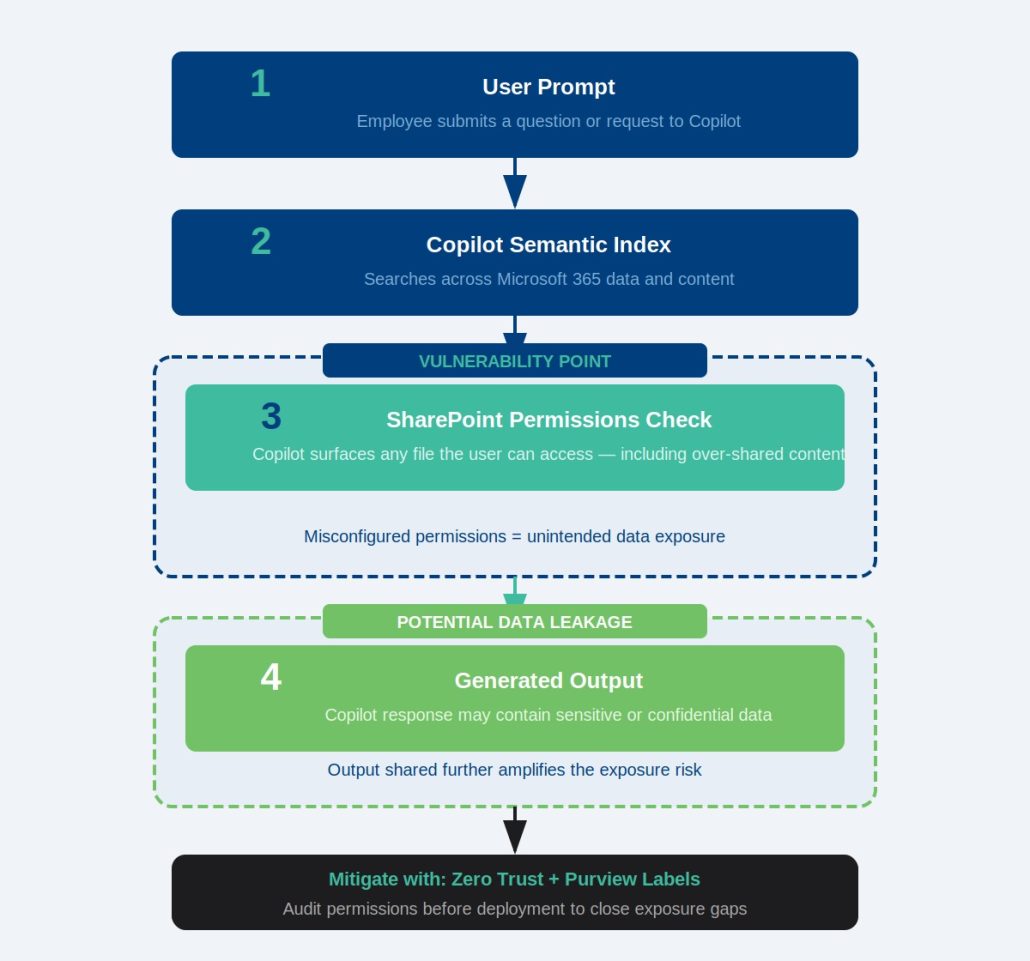
The general availability of Agent 365 marks a major milestone in the evolution of workplace productivity. For nonprofits, this means AI agents can now coordinate complex workflows, manage donor databases, and draft impact reports with minimal manual intervention.
However, Agent 365 does not create new data permissions; instead, it operates strictly within the boundaries of existing user access. If an employee has access to a file—even if they do not know it exists—Agent 365 can find, read, and summarize that file in response to a prompt. This means that legacy files, old payroll spreadsheets, or sensitive HR documents stored in poorly configured SharePoint folders are suddenly highly discoverable.
The SharePoint Oversharing Dilemma: Why Governance Must Come First
Most nonprofits suffer from “dark data” and overshared SharePoint sites, where legacy permissions grant broad access to sensitive information. Before activating Microsoft Copilot, organizations must audit their data footprint using advanced governance tools to prevent accidental internal data leaks.
In the non-profit sector, files are frequently shared across departments, external volunteers, and board members. Over time, this collaborative culture leads to permission creep. Common issues include:
- “Everyone except external users” links: These links are often used to share documents quickly, granting access to every internal user in the tenant.
- Broken permission inheritance: Individual folders or files within a restricted SharePoint site may have custom permissions that inadvertently expose them to unauthorized eyes.
- Outdated guest access: Former volunteers or temporary contractors may still retain active access to internal resource libraries.
To mitigate these risks, organizations should utilize data access governance solutions, such as those provided by AvePoint, to automatically discover, classify, and secure sensitive data. By implementing automated governance policies, you can ensure that your data is clean and properly restricted before Copilot indexes your tenant.
Pre-Deployment Checklist: 5 Critical Steps for Nonprofits
Preparing for Microsoft Copilot requires a structured approach to identity, data, and user readiness. By executing a targeted pre-deployment checklist, your nonprofit can safely leverage agentic AI while maintaining strict compliance with donor privacy regulations and grant requirements.
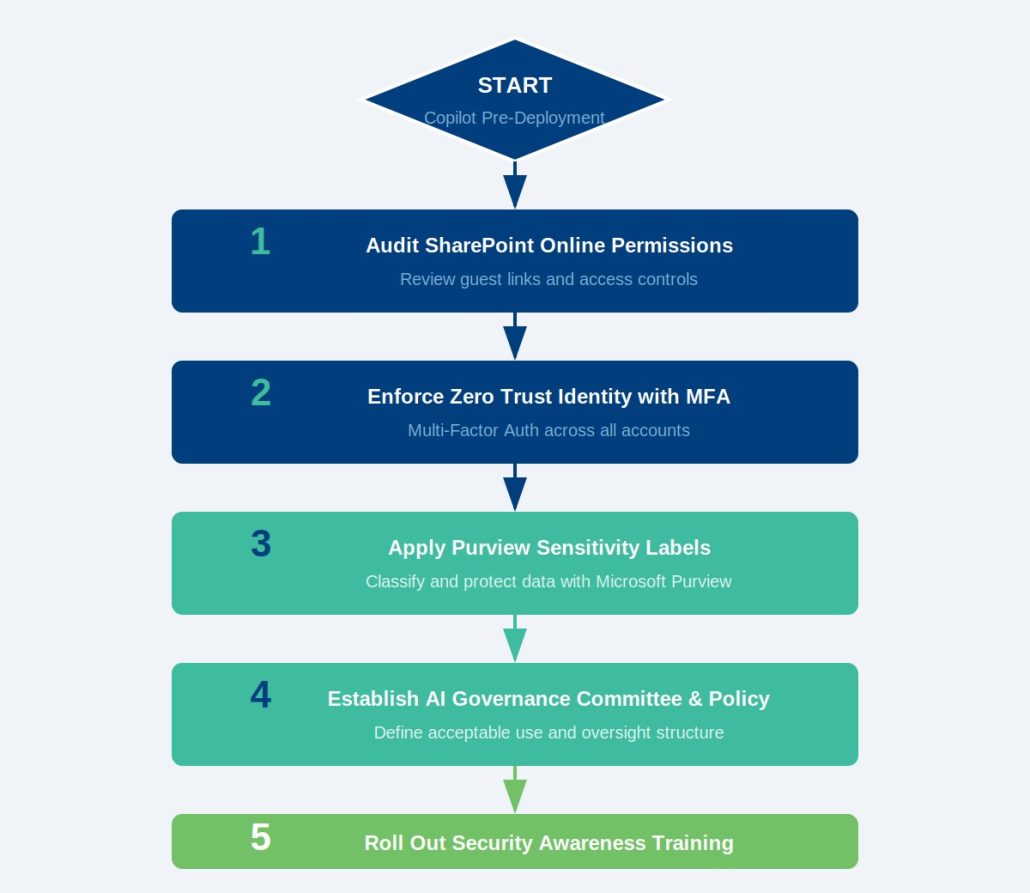
1. Audit and Restrict SharePoint Permissions
Identify and remediate overshared folders, broken permission inheritance, and “anyone” sharing links within your SharePoint Online environment. Use Microsoft Purview or AvePoint to run comprehensive data access reports, focusing specifically on sites containing donor records, financial data, and strategic plans.
2. Implement Zero Trust Identity Management
Secure user access to Microsoft 365 applications by enforcing multi-factor authentication (MFA) and conditional access policies. Integrating identity providers like Okta ensures that only verified users on compliant devices can interact with specialized AI agents and query internal systems.
3. Define Sensitivity Labels and Data Classification
Apply Microsoft Purview Information Protection to classify sensitive files, such as donor financial details or employee records. This step is critical because Copilot respects sensitivity labels; files marked as “Highly Confidential” can be excluded from AI summaries or restricted to specific user groups.
4. Establish an AI Governance Committee
Create a cross-functional team consisting of project managers, compliance officers, and IT leads to define acceptable use policies for generative AI. This committee should establish clear guidelines on what types of data can be processed by Agent 365 and who has authorization to build custom AI agents.
5. Train Staff on Prompt Engineering and Security Awareness
Educate your team on how to write safe, effective prompts and recognize the risks of inputting personally identifiable information (PII) into AI tools. Utilizing security awareness platforms like Knowbe4 helps build a security-first culture, ensuring that employees understand their role in protecting organizational data.
Partnering for a Secure AI Journey
Deploying generative AI is a fundamental shift in how your nonprofit interacts with its data. Partnering with experienced managed service providers ensures your Microsoft 365 tenant is fully optimized, secured, and ready for Agent 365.
While the potential of Agent 365 to streamline non-profit operations is immense, the technical preparation required can overwhelm lean IT teams. Ensuring your data governance, identity management, and security protocols are aligned is a complex undertaking.
CIT Solutions helps nonprofits navigate this transition smoothly. From conducting comprehensive SharePoint permission audits to implementing robust identity frameworks with Okta and data protection policies with AvePoint, we ensure your organization is fully prepared to leverage the power of AI safely and effectively.
Ready to prepare your tenant for the future of work? Get in Contact with our team of experts today to schedule your AI readiness assessment.
Sources:
Microsoft Security Blog | https://www.microsoft.com/en-us/security/blog/2026/05/01/microsoft-agent-365-now-generally-available-expands-capabilities-and-integrations
AvePoint Blog | https://www.avepoint.com/shifthappens/blog/microsoft-agent-365-agentic-era-governance
AvePoint Blog | https://www.avepoint.com/blog/microsoft-365/microsoft-365-data-access-governance-strategy